
Widefield Instrument
Gust
Aeolian harp
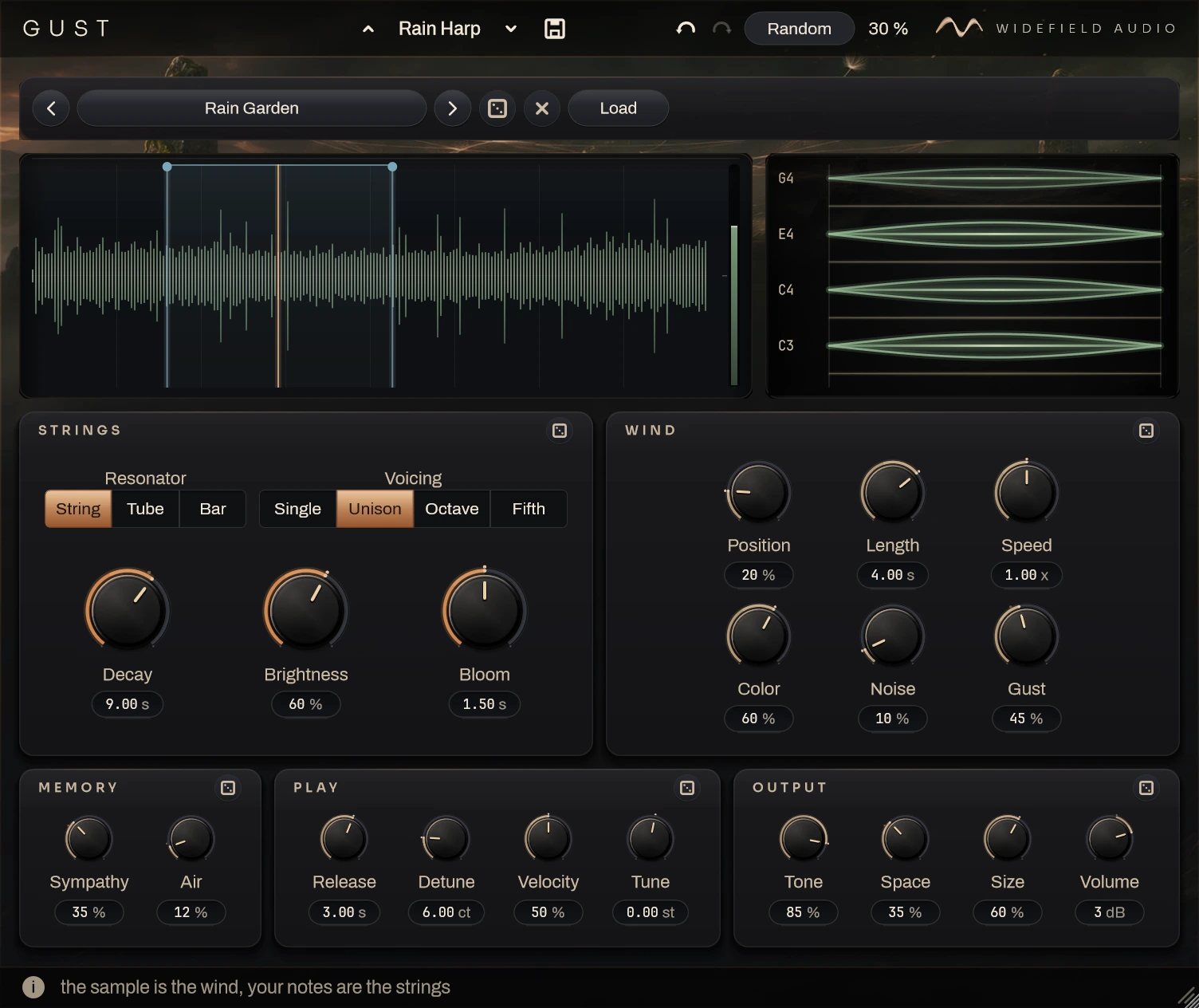
A looped sample excites resonators tuned to MIDI notes, like wind across an aeolian harp. Six sympathetic resonators continue to respond at recently played pitches.
- Window
- 752 × 632
- Automatable
- 21
- Controls
- 21
- Presets
- 9
- MIDI in
- Yes
- Format
- VST3
In practice
Play a chord over the rain loop to hear the resonators add pitch to the recording. Decay sets how long they ring and Brightness adjusts their tone. Raise Sympathy to hear the pitches continue after you release the keys. Alt-drag Decay or Tune to give it a random range, and each string picks its own value inside it.
The waveform shows the source loop and its playback position. The display beside it draws each active resonator as a string whose vibration follows how strongly it is ringing, with played and sympathetic strings in different colours.
Reach for it whenPlay pitched parts from a rain or breath recording while keeping some of its original texture.
- 01
Sample excitation
The original loop drives the resonators without pitch shifting. The notes you play tune the resonators.
- 02
String, Tube and Bar
String uses the full harmonic series, Tube uses odd harmonics and Bar uses four inharmonic modes. Course adds a detuned unison, octave or fifth.
- 03
Bloom and Sympathy
Bloom sets how slowly the played notes build. Sympathy sets the level of six resonators tuned to the last six distinct notes played.
- 04
Loop and noise controls
Set the loop region and speed. Color shapes the source, Noise adds white noise, Air sets the level of the dry wind and Gust varies the excitation level.
Signal path
- Sample loop
- Wind
- Strings
- Sympathy
- Space
- Volume
Controls
By section, in interface order.
Strings
- Body
- Course
- Decay
- Brightness
- Bloom
Wind
- Position
- Length
- Speed
- Color
- Noise
- Gust
Memory
- Sympathy
- Air
Play
- Release
- Detune
- Velocity
- Tune
Output
- Tone
- Space
- Size
- Volume
Factory presets
9 included. Save your own from the preset menu.
- Init
- Rain Harp
- Hollow Drone
- Breath Strings
- Slow Aurora
- Bell Garden
- Distant Choir Loft
- Aeolian Memory
- Glass Tubes
Listen
- Rain Harp preset, Cmaj7 Am7 Fmaj7 G7 on rain
- Hollow Drone preset, low tubes on breath
- Bell Garden preset, bar resonators driven by bowed metal
Install
Download Gust- 01
Extract
Download the ZIP file and extract it. It contains one .vst3 folder.
- 02
Copy
Copy Widefield Gust.vst3 to C:\Program Files\Common Files\VST3. Windows may ask for administrator permission.
- 03
Rescan
Rescan plugins in your DAW and look for Widefield Gust.