
Widefield Effect
Terrain
Reactive texture
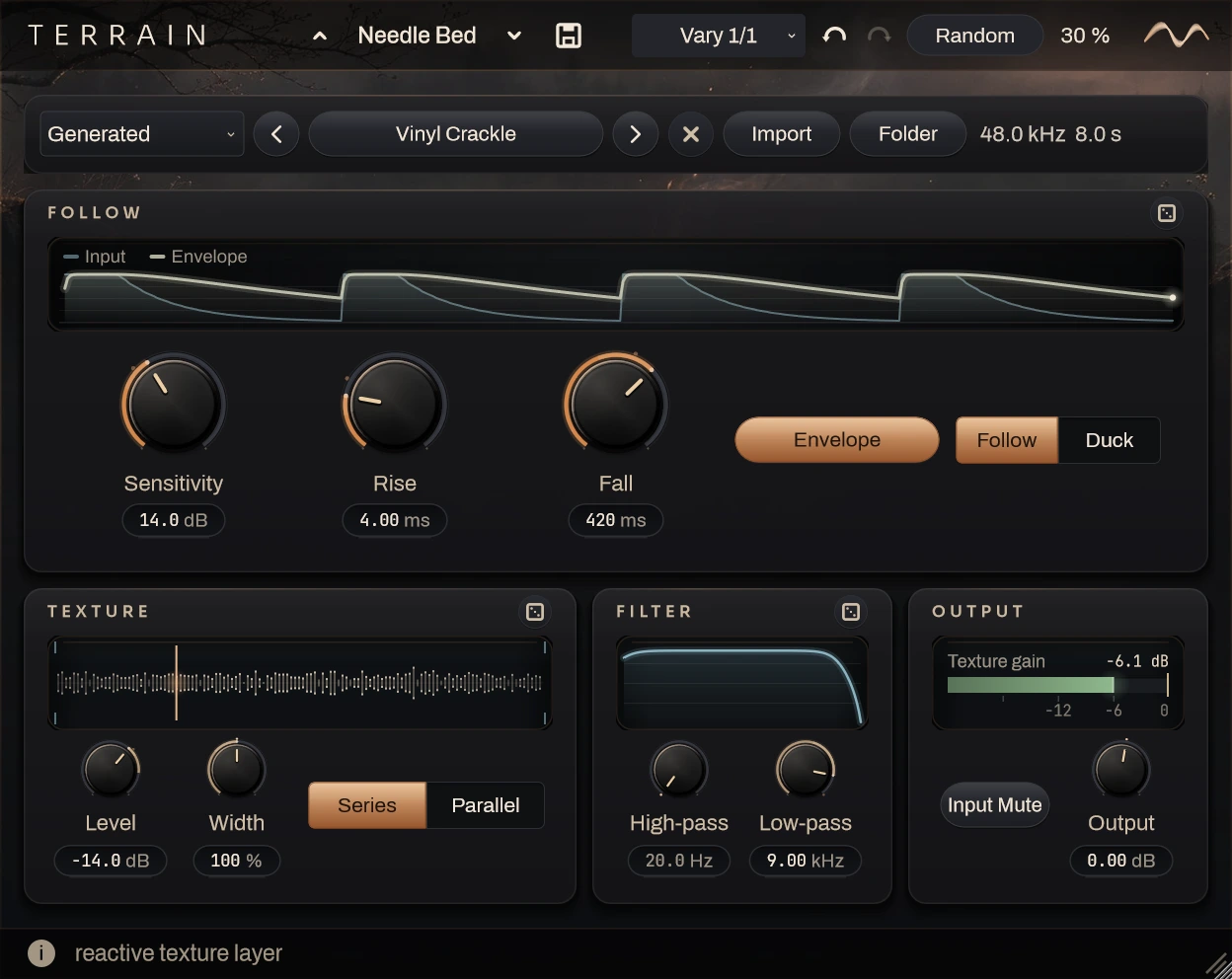
Noise Follow loops a texture alongside the input. Follow raises the texture with the input level. Duck brings it up as the input gets quieter.
- Window
- 624 × 496
- Automatable
- 14
- Controls
- 14
- Presets
- 9
- MIDI in
- No
- Format
- VST3
In practice
Set a short Rise to bring the texture in quickly and a longer Fall to let it recede between hits. In Duck mode, adjust those times to fit the spaces between phrases.
Turn Envelope off to keep the texture at a fixed level. Input Mute lets you hear the texture by itself while the input continues to drive the envelope follower. The ✕ in the source bar removes the texture and leaves only the input.
Alt-drag High-pass or Low-pass to give it a random range. At each Vary division chosen in the header, the filter picks a new frequency inside that range.
Reach for it whenAdd vinyl crackle to drum hits or let rain fill the pauses in a vocal.
- 01
Envelope response
Rise and Fall set separate response times from 1 ms to 2 s.
- 02
Built-in sources
Thirteen generated 8-second loops include vinyl crackle, rain, tape hiss, mains hum and white, pink and brown noise.
- 03
Audio import
Load WAV, AIFF, FLAC, OGG or MP3 files up to 600 s long. Use the waveform handles to set the loop region.
- 04
Texture filters
The 24 dB/octave low-pass and high-pass filters can run in series or parallel. Both filters and the width control apply to the texture layer.
Signal path
- Envelope follower
- Texture loop
- High-pass and low-pass
- Width
- Texture level
- Sum with input
Controls
By section, in interface order.
Follow
- Sensitivity
- Rise
- Fall
- Envelope
- Follow / Duck
Texture
- Level
- Width
- Series / Parallel
Start / End
- Start
- End
Filter
- High-pass
- Low-pass
Output
- Input Mute
- Output
Factory presets
9 included. Save your own from the preset menu.
- Init
- Needle Bed
- Wet Window
- Cassette Air
- Ground Loop
- Static Pulse
- Storm Under
- Brown Fog
- Ghost Rhythm
Listen
- Needle Bed preset following a felt piano phrase
- Wet Window preset following a felt piano phrase
Install
Download Terrain- 01
Extract
Download the ZIP file and extract it. It contains one .vst3 folder.
- 02
Copy
Copy Widefield Terrain.vst3 to C:\Program Files\Common Files\VST3. Windows may ask for administrator permission.
- 03
Rescan
Rescan plugins in your DAW and look for Widefield Terrain.