
Widefield Effect
Spore
Granular scatter
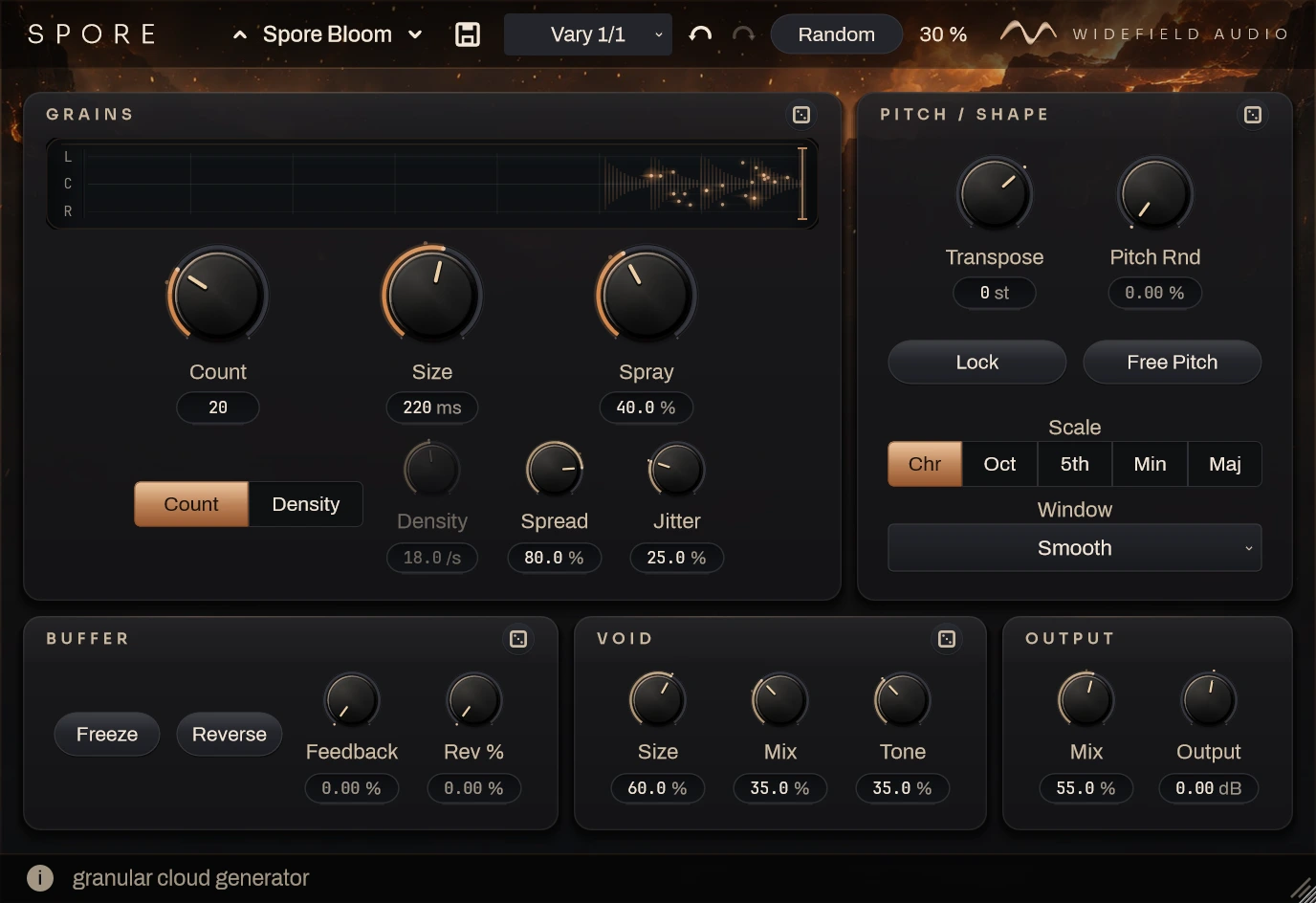
Grain Scatter records into a 9-second buffer and plays it back in up to 64 overlapping grains. Pitch can follow a scale, and the grains can feed the Void reverb.
- Window
- 688 × 472
- Automatable
- 22
- Controls
- 22
- Presets
- 8
- MIDI in
- No
- Format
- VST3
In practice
Spray controls how far back in the buffer grains can start, up to four seconds. Four window shapes set how each grain fades in and out.
Try Fifths with some Pitch Rnd on a sustained note to hear several pitches overlap. Freeze keeps the current buffer available while you continue playing. Lock preserves your pitch settings when changing presets.
Alt-drag Spray or Transpose to give it a random range. At each Vary division chosen in the header, the knob picks a new value inside that range and the next grains use it.
Reach for it whenFreeze part of a live performance and keep playing over it.
- 01
Grain count and density
Size sets the nominal grain length from 30 ms to 1 s. Count maintains a fixed number of grains. Density generates 1 to 100 grains per second.
- 02
Grain pitch
Transpose from -24 to +12 semitones. Pitch Rnd uses chromatic notes, octaves, fifths, or a minor or major scale. Free Pitch allows detuning by up to 12 semitones.
- 03
Freeze, Reverse and Feedback
Freeze stops recording. Reverse applies to all grains, while Rev % sets a probability. Feedback returns the grains to the buffer at up to 95%.
- 04
Void reverb
Void has a decay range of 2.5 to 15.5 s and a tone control from 900 Hz to 9 kHz.
Signal path
- Input buffer
- Grain engine
- Window and pan
- Void reverb
- Dry/wet mix
Controls
By section, in interface order.
Grains
- Count
- Size
- Spray
- Spread
- Density
- Jitter
- Count / Density
Pitch / Shape
- Transpose
- Pitch Rnd
- Lock
- Free Pitch
- Scale
- Window
Buffer
- Freeze
- Reverse
- Feedback
- Rev %
Void
- Size
- Mix
- Tone
Output
- Mix
- Output
Factory presets
8 included. Save your own from the preset menu.
- Init
- Glass Pollen
- Under Moss
- Fifth Mycelium
- Minor Lantern
- Major Drizzle
- Backwards Fog
- Abyssal Swarm
Listen
- Spore Bloom preset on a music box
- Glass Pollen preset on a music box
Install
Download Spore- 01
Extract
Download the ZIP file and extract it. It contains one .vst3 folder.
- 02
Copy
Copy Widefield Spore.vst3 to C:\Program Files\Common Files\VST3. Windows may ask for administrator permission.
- 03
Rescan
Rescan plugins in your DAW and look for Widefield Spore.